MeloTick
- 3.4
- Rating
- 1.00M
- Installs
- Free
- Price

 Analysis by App-foxy
I approached MeloTick as a small experiment in making daily productivity feel less scattered. Its promise is easy to understand: help me wake up better, keep track of time, and avoid forgetting important things. That sounds simple, but those three jobs usually live in separate tools. An alarm handles waking, a timer handles duration, and a notes or task app holds reminders. MeloTick is interesting because it tries to bring that mental load into one place rather than asking me to maintain several disconnected habits.
It is a free productivity app from Dorothy Craigie, currently at version 1.3.5. The app is marked Mature 17+, and it runs on Android 7.0 or later. With more than a million installs and an average rating of 3.4 from roughly four hundred fifty ratings, it has clearly attracted a meaningful audience, although the mixed score also tells me that the experience will not suit every routine equally well.
Why a single routine can work better than scattered reminders
Before using an app like this, my usual workflow would be familiar to many people: set an alarm, write down a few tasks, check the clock repeatedly, and hope that an unfinished item does not disappear beneath newer notifications. The problem is not always a lack of motivation. Often, it is the friction between tools. An alarm wakes me, but it does not explain what I should do next. A task list records an intention, but it does not necessarily connect that intention to the time available.
You May Also Like

 Blood Strike: 2.5 Anniversary
Blood Strike’s Loadouts Turn Every Drop Into a Tactical Gamble
A close look at Blood Strike’s custom loadouts: how fast access to signature weapons reshapes its battle royale rhythm, rewards preparation, and narrows the gap between fights.

 Pandora - Music & Podcasts
Pandora’s Music Is Easy to Start, but Harder to Recover
Pandora’s strength is its low-effort path from a seed to a station. Its weak spot is how much confidence it asks you to place in connection, setup, and quiet recovery.

 8 Ball Pool
 Is Built on Rivalries, Rematches, and Routine
A close look at the rivalries, rematches, shared routines, and unanswered safety questions that turn a quick pool match into a persistent mobile community.

 Samsung Music
’s Quiet Strength Is Playing What You Already Own
Its reach comes less from spectacle than from dependable access to a personal library. That simplicity is both the app’s strongest retention engine and its ceiling.

 AccuWeather: Weather Radar
AccuWeather Review: A Quick, Clear Forecast for Everyday Decisions
For everyday plans, the best forecast is the one you can understand quickly. AccuWeather makes rain timing, radar, and local conditions easy to act on, with a few trade-offs.

 Hill Climb Racing
Why Hill Climb Racing Still Turns Crashes Into One More Run
A tiny car, a bumpy hill and one more upgrade: Hill Climb Racing keeps resurfacing because its simple chaos makes every near-miss feel personal.
More From Our News Desk



MeloTick makes the most sense when I treat it as a bridge between intention and action. Instead of asking, “What should I remember today?” and “How long will this take?” as completely separate questions, I can build a more practical sequence around both. That shift is more important than any individual control. The app becomes useful when it supports a repeatable pattern rather than acting as another place to collect abandoned plans.
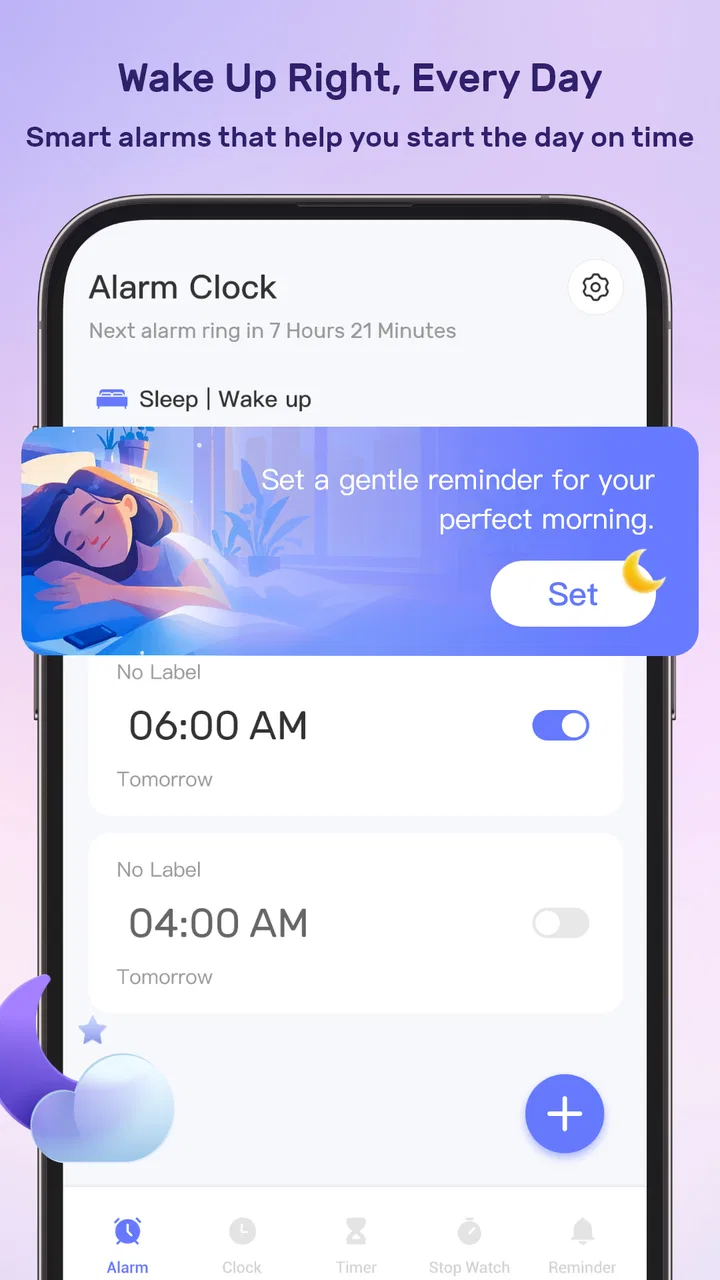
A realistic example is a weekday morning. I may need to get up, prepare, check a message, pack something, and leave on time. A normal alarm only tells me when the morning begins. A conventional to-do list may show the tasks but leave me guessing how much attention each deserves. MeloTick is better suited to the middle ground: turning the morning into a short chain of time-aware actions that I can follow without constantly rebuilding the plan.
The strongest idea here is not adding more reminders; it is reducing the number of decisions I have to make after the day has already started. That matters for people who lose momentum during transitions, especially when moving from sleep to work, from a break back to study, or from one household responsibility to another.
Capturing tasks without creating another messy inbox
The first habit I would build with MeloTick is quick capture. Whenever a task comes to mind, I would record it before trying to organize it perfectly. This is useful for small obligations that are easy to underestimate: sending a document, taking something with me, checking a deadline, or remembering a short personal errand. The value comes from getting the thought out of my head before it competes with whatever I am doing.
However, capture alone is not organization. A long list of vague entries can become another source of stress. I found it more sensible to turn each item into an action that can be recognized immediately. “Prepare for tomorrow” is broad; “put the charger in the bag” is concrete. “Work on the project” is difficult to place in a routine; “review the opening section” gives me a clearer starting point. The app can support remembering, but I still need to write tasks in a way that makes them usable.
One practical technique is to separate actions by when they matter rather than by how important they sound. A task needed before leaving belongs in the morning sequence. A task that can wait until later should not compete with the first hour of the day. This prevents the common productivity mistake of treating every item as urgent simply because it has been written down.
I would also avoid turning MeloTick into a storage system for every idea I have. It is more effective for things that need a time, a prompt, or a clear next step. Long notes, reference material, detailed project planning, and collaborative work are better handled by a dedicated notes or project-management app. Using the right tool for each kind of information keeps this app focused instead of forcing it to become a replacement for everything.
Turning the list into a routine that can survive real mornings
The most useful workflow is to create a routine around a stable sequence. For example, I might begin with waking, follow with a short preparation period, then move to one essential task before checking less important items. The exact order will differ from person to person, but the principle is consistent: the routine should describe what normally happens, not an idealized version of a perfect day.
This is where time tracking becomes more than a stopwatch. If I repeatedly allocate too little time to getting ready, the problem is not that I failed to be disciplined. The plan itself is inaccurate. I can adjust the next routine instead of blaming myself for missing an unrealistic target. That makes the app more useful as a feedback tool than as a strict judge.
A good routine should also contain breathing room. If every minute is assigned, one delayed action can make the rest of the sequence feel pointless. I prefer leaving a small gap between important transitions, particularly in the morning. The purpose is not to optimize every second. It is to make the next action obvious while allowing ordinary interruptions.
Another non-obvious use is creating a shutdown routine rather than focusing only on waking. A short evening sequence can help me collect loose tasks, prepare essentials, and decide what genuinely needs attention tomorrow. That reduces the number of decisions waiting for me when I am tired. In this role, MeloTick is not merely an alarm companion; it can become a boundary between today’s unfinished thoughts and tomorrow’s starting point.
For students, the same idea can support study blocks. I would use it to define a beginning, a focused period, and a stopping point, rather than leaving a vague instruction to “study more.” For remote workers, it can mark the transition into work and the point at which work should end. For household routines, it can keep a few recurring actions visible without requiring a complex project board.
Using time tracking honestly instead of chasing perfect productivity
Time tracking can easily become counterproductive. If I record every tiny interruption, I may spend more energy measuring work than doing it. MeloTick is most helpful when I use tracking to answer a practical question: where does my routine regularly break down? I do not need a perfect historical record. I need enough awareness to see whether a task consistently takes longer than expected or whether I keep postponing the same transition.
That distinction also helps with motivation. A timer should give me information, not pressure me into racing. If I rush through preparation to satisfy a target, the routine may look efficient while making the rest of the day harder. I would rather use the app to establish a realistic rhythm, then revise it when circumstances change.
There is a useful trade-off between precision and simplicity. A detailed schedule can be reassuring when the day is predictable, but it becomes burdensome when meetings, travel, family needs, or interruptions are common. In those situations, I would track only the anchors: wake-up, departure, one priority, and the end of the work period. That keeps the system alive without requiring constant maintenance.
This is also why I would not compare MeloTick directly with a full calendar. A calendar is better for appointments involving other people and fixed commitments. A conventional task manager is better for projects with many dependencies. MeloTick occupies a more personal space: the repeated, time-sensitive actions that help a day move from one stage to the next.
Where the experience can become frustrating
The mixed average rating is worth taking seriously. An app built around reminders and routines has to fit naturally into daily life, and even a small amount of friction can weaken trust. If recording a task feels slower than writing it on paper, I am likely to bypass the system. If the routine demands too much adjustment, I may stop maintaining it. These are not minor concerns; they determine whether a productivity tool becomes a habit or gets abandoned.
The central limitation is that MeloTick cannot decide which commitments deserve my attention. It can help me remember and structure them, but it cannot distinguish a meaningful priority from a low-value distraction unless I do that work myself. Someone looking for automatic planning, deep project management, or a complete calendar replacement may find the app too narrow.
There is also a risk of overloading the routine. Adding every household chore, personal goal, message, and idea can turn a helpful sequence into a stream of prompts. I would start with one repeatable situation, such as the morning or the transition into study, and only expand after that routine feels natural. This gradual approach is more sustainable than attempting to organize an entire life in one sitting.
People who need highly collaborative tools should probably look elsewhere. A team task system, shared calendar, or project board will be more appropriate when several people must assign work, discuss changes, and see the same status. MeloTick is better for personal follow-through than group coordination.
I would also be cautious if I dislike notifications or if my days are deliberately unstructured. The app’s value depends on accepting some external prompts and using them as cues. For someone who prefers a paper notebook, a simple alarm, or an entirely flexible day, adding a digital routine may feel like unnecessary supervision rather than support.
Small workflow decisions that make a noticeable difference
My first recommendation is to write the next physical action, not the desired outcome. This makes prompts easier to obey. Instead of entering a broad goal, I would define the smallest useful beginning. That reduces the pause between seeing the reminder and knowing what to do.
Second, I would keep a “minimum version” of each routine. On a normal day, the sequence might include several steps. On a difficult day, it could shrink to the one or two actions that protect tomorrow. This prevents an imperfect day from becoming a failed system. A routine that can bend is more valuable than one that works only under ideal conditions.
Third, I would review the routine at the end of the day rather than constantly editing it. If I change times every time something goes wrong, I will never learn whether the basic structure works. A short review lets me identify repeated friction: a task that belongs elsewhere, a transition that needs more space, or a reminder that is no longer meaningful.
Fourth, I would use separate levels of urgency carefully. Not everything that I want to remember needs an immediate prompt. Some items are better captured for later review, while others need to be tied to a specific moment. Treating these as different kinds of information keeps the system calmer and makes important cues easier to notice.
Finally, I would protect the app from becoming a guilt machine. Missed tasks should be treated as feedback about timing, energy, or priority. If I repeatedly ignore the same reminder, I would either rewrite the action, move it to a more realistic point, or remove it. Keeping a reminder that I never follow only teaches me to ignore future reminders.
Who will get the most from this productivity app?
I think MeloTick is a good match for someone who wants a lightweight personal routine centered on waking, time awareness, and remembering small but important actions. It may be especially useful for people whose days have recognizable transitions but whose attention becomes unreliable during those transitions. Students, remote workers, busy household managers, and anyone rebuilding a morning routine could all find a practical starting point.
The free price makes experimentation easy. I can try it without committing money, which is helpful because the real question is not whether the concept sounds appealing. The real question is whether the prompts fit my natural behavior. I would give it a fair trial with one routine, rather than filling it with every possible task on the first day.
The Mature 17+ content label is another detail parents and younger users should consider before choosing it. For adults, the label is unlikely to be a deciding factor, but families selecting productivity tools for teenagers should check that the app suits their household rules and age requirements.
The app is less convincing for people who need advanced scheduling, shared responsibilities, detailed project views, or extensive note-taking. In those cases, a calendar, task manager, or collaborative workspace will probably remain the better primary tool. MeloTick can still complement one of them, but I would not expect it to replace all three.
My conclusion after fitting it into a sustainable system
I see MeloTick as a focused productivity companion rather than an all-purpose organizer. Its appeal comes from connecting wake-up habits, time tracking, and memory support in a routine that I can repeat. That is a useful niche, especially when the problem is not a lack of apps but the lack of continuity between them.
My advice is to begin with a single dependable sequence, keep the actions concrete, leave space for real life, and review what repeatedly fails. Used that way, the app can reduce morning guesswork and make small commitments easier to carry through. Used as a giant list for every responsibility, it is more likely to become noisy.
With over a million installs, MeloTick is clearly not an obscure experiment, yet its 3.4 average suggests that personal fit matters. I would recommend trying it to anyone who wants a simple, time-aware routine and is willing to shape the system around real behavior. I would skip it as a primary organizer if I need collaboration, complex projects, or a full calendar. For the right user, though, its best contribution is modest and valuable: helping the next action arrive at the right moment without making productivity feel like another full-time job.
FAQs for MeloTick
01What is MeloTick and what can I use it for?
MeloTick is designed as a music-focused application that helps users interact with musical content in a simple and accessible way. Depending on the version available on your device, it may include tools for discovering, organizing, practicing, or enjoying music. Before downloading, check the official store description to confirm its current features, supported devices, and whether it matches the specific music experience you are looking for.
02Is MeloTick free to download and use?
MeloTick may be available as a free download, but some features can require in-app purchases, a subscription, or additional payments. Store listings usually explain whether the app includes advertising, premium tools, or trial periods. I recommend reviewing the pricing information before installing it, especially if you plan to use advanced functions regularly or allow children to access the application.
03Does MeloTick require an internet connection?
The connection requirements can vary depending on how you use MeloTick. Basic navigation or previously saved content may work offline, while streaming, account synchronization, updates, online libraries, or other connected features may require Wi-Fi or mobile data. If data usage is important to you, review the app permissions and test its offline behavior before relying on it while traveling.
04Is MeloTick suitable for beginners and experienced music users?
MeloTick can be useful for different types of users, but its suitability depends on the features included in the current release. Beginners should look for a clear interface, guided options, and simple controls, while experienced users may expect customization and more advanced tools. Checking screenshots, recent reviews, and the developer’s feature description can help set realistic expectations before downloading.
05What permissions and privacy considerations should I know about MeloTick?
Before installing MeloTick, review the permissions requested by the application and compare them with the features it provides. A music app may reasonably need access to audio, storage, notifications, or an account, but unnecessary permissions deserve closer attention. Also read the privacy policy to understand how usage information, device data, and any account details may be collected or shared.
Pros
- Simple interface makes creating and managing reminders quick.
- Flexible repeat options suit daily
- weekly
- and custom routines.
- Useful notifications help keep important tasks from being forgotten.
- Lightweight design should run smoothly on most modern devices.
- Helpful for organizing personal
- work
- and study-related commitments.
Cons
- Advanced features may require time to discover and configure.
- Notification reliability can depend on device battery settings.
- Limited collaboration tools make it less suitable for teams.
- Customization options may feel basic for power users.
- Frequent reminders could become distracting when many are enabled.

MeloTick
Gallery